What You Need on a Phone
Coldanswers needs a current browser and a connection. That is the whole list: no app, no account, no payment, no notification permission. On iOS any recent version of Safari works, and Chrome, Firefox and Edge all run on the same engine. On Android Chrome, Firefox, Edge and Samsung Internet all work. An old browser is the most common reason a phone shows a broken layout, so update the operating system and the browser before blaming the game.
Step by Step on an iPhone
- Open Safari and go to coldanswers.com.
- You land on today's daily set: five category prompts for the day, with a single Start button. Read the categories first if you want a warm-up.
- Tap Start. Each round gives you 25 seconds to type a valid answer, so keep the keyboard up and your thumb near the submit key.
- After five rounds you see your Coldness Score for each round, a 500-point daily total, four ice-cold examples you could have picked, and a spoiler-free share card you can copy into a message.
Step by Step on Android
The steps are identical in Chrome. One Android detail is worth knowing: the on-screen keyboard can cover the lower part of the page, so if the answer box feels cramped, scroll once so the prompt and the timer sit above the keyboard. Submitting an answer closes the keyboard and reveals the thermometer without reloading the page.
Add Coldanswers to Your Home Screen
A home screen shortcut gives you a one-tap icon with no app store involved. On iOS, open coldanswers.com in Safari, tap the share button and choose Add to Home Screen. On Android, open it in Chrome, tap the three-dot menu and choose Add to Home screen. The shortcut always opens the current day's puzzle, so you never land on yesterday's set after the 00:00 UTC reset.
Playing Well on a Small Screen
- Read the prompt twice before typing. On a phone your eyes move between the prompt and the keyboard, and a misread prompt wastes most of the 25 seconds.
- Trust the typo tolerance and keep moving. Capitalisation, accents, leading articles and common aliases are ignored, and a single-letter typo is forgiven on words of five or more letters, so a near-miss spelling usually still scores.
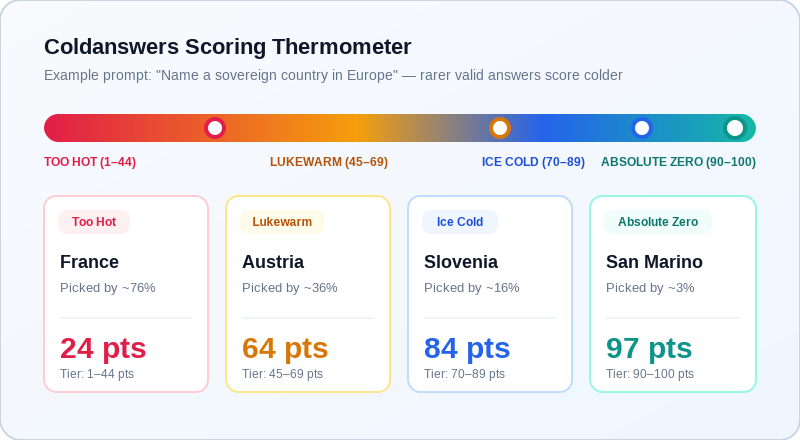
- Skip your first instinct. The obvious answer is the one everybody else types as well, and obvious picks score in the Too Hot band. Pause for two seconds and look toward the edge of the category.
- Practise untimed on the phone first. Practice Mode lets you switch the 25-second clock off, which is the fastest way to learn how the on-screen keyboard behaves before a real daily run.
A Note on Data and Battery
The game is a single page with no video and no background polling, so a daily five-round run costs very little data or battery. Five rounds take about two minutes plus reading time. If the page will not load at all, the Coldanswers not loading guide walks through the fixes in the order they usually work.